The Main Window is the launching point for all controls in the Profile Creator. It is divided into 2 major sections:
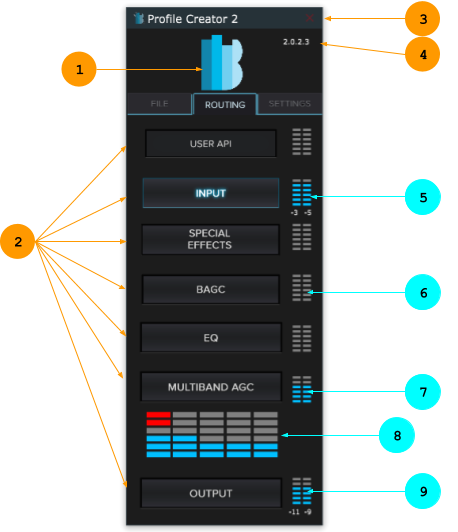
- Top section – Provides master enable/bypass of the algorithm, current version and user authentication status.
- Click the “B” logo to enable/bypass the entire DPS algorithm for all instances.
- Bottom section – 3 tabs for major operations:
- File tab – Load/Save/Export functions for various file formats.
- Routing tab – Algorithm signal path, parameter controls, and meters.
- Settings tab – Platform connection, debugging, and UI settings.
- Close the application – You will be prompted to confirm exiting the app.
- Current Version Number – Displays the version number of Profile Creator.
- After connecting to a platform, the core algorithm’s version number is displayed.
NOTE: All user preferences are stored in:
C:\Users\\AppData\Roaming\Bongiovi Acoustics\Profile Creator 2\App.settings
Autosave
The current state of the UI is saved every 30 seconds in:
C:\users\<your user>\BgvPCAutoSave\PCAutosave-<current date>.bgps